
 Smart Control
 Companion / Upgrader

What do you need to know (better understanding)
What is CAN BUS (Controlled Area Network)?
CAN Network or CAN BUS is a closed digital network between all computers in the car like Body Computer, Instrument Panel, Gear Box, Climate Control, Doors Nodes and etc.
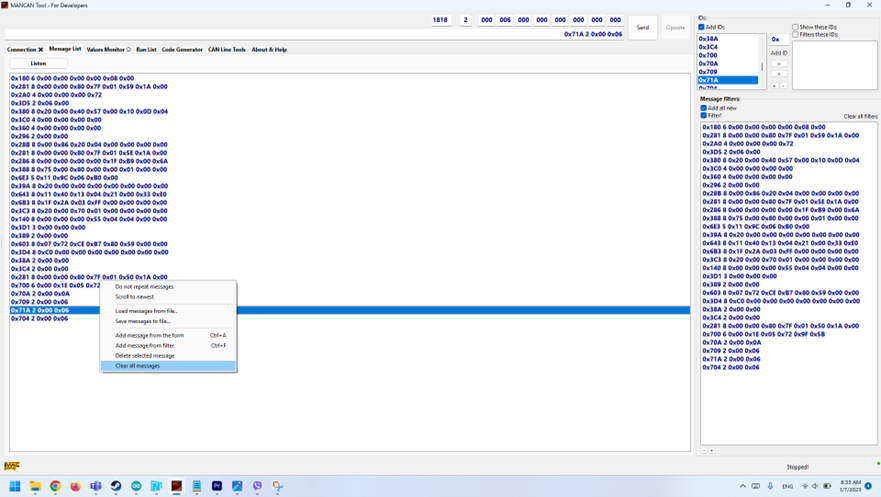
With MANCAN Tool Module and our software MANCAN Tool for DEVELOPERS you can follow and sniff all the information, also you can represent yourself as a computer.
The communication consists of continuous messages that come from certain sources represented by:
|
0x000 |
8 |
0x00 |
0x00 |
0x00 |
0x00 |
0x00 |
0x00 |
0x00 |
0x00 |
|
ID |
Length |
Data 1 |
Data 2 |
Data 3 |
Data 4 |
Data 5 |
Data 6 |
Data 7 |
Data 8 |
- ID – Where from data coming
- 0x180 – Information about the status of body computer (brake switch, lights info and more)
- 0x281 – Contains information about the engine temperature, consumption, engine speed and etc.
- 0x28B – Q-Tronic Gear Box
- Length – Shows how many data blocks come with this message.
- Data 1 to 8 – Contain the concrete information.
Example:
0x180 6 0x80 0x68 0x20 0x00 0x00 0x00
the ID is Body Computer (Switches) and we expect 6 blocks with information
- Data 1 – Status of the brake pedal:
- 0x00 is released
- 0x80 is pressed
- Data 2 – Status of the lights switch:
- 0x60 side lights
- 0x68 headlights
- 0x78 high beams
- Data 3 – Turning lights:
- 0x20 left turning lights
- 0x40 right turning lights
- 0x60 both turning lights
From this message, we can determine that the brake lights, marker lights, and low beams are on, but the left turn signal is also on at the right time.
- Change the firmware of the MANCAN Tool with MANCAN Tool for DEVELOPERS via MANCAN Tool Upgrade tool.
- Open MANCAN Tool CANBUS Tester
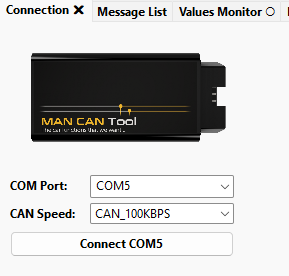
- Select the right COM Port and choose the speed of communication and click “Connect COM…”